Home About Services Work Blog Contact
← Back to Work

Case Study

EOS

An n8n-powered automation layer connecting Glide, Google Sheets, and QuickBooks, turning a laggy manual data-entry app into a real-time chat-driven business operating system for an emergency restoration company.

AI Workflows n8n Automation Glide Apps API Integration Chat Interface
Proprietary — n8n + Glide + QuickBooks
Client
Disaster Response
Industry
Emergency Restoration & Remediation
Services
AI Workflow Automation, n8n & Glide Integration, QuickBooks API, Chat Interface
Region
United States

The Challenge

A Laggy App Was Costing Them Clients

The company had built their operations around a Glide app that was meant to centralize lead tracking, project management, budget oversight, and client communications. In theory it was the perfect tool. In practice, the person responsible for updating and managing the app was drowning.

Every piece of data, a new lead, a budget change, a project status update, had to be entered manually. As the dataset grew, the app became increasingly laggy. When a business owner needed to check a client's budget on-site or resolve a question about a job mid-conversation, they had to call the app manager. The answer could take anywhere from a couple of minutes to several hours. Clients waited, competitors called, and deals slipped away.

The core workflows that should have been instantaneous were bottlenecked by a single person manually feeding data into a system that was never designed for the scale it was reaching. The company needed a way to decouple data entry from data access, and give every decision-maker the ability to query their own business in real time.
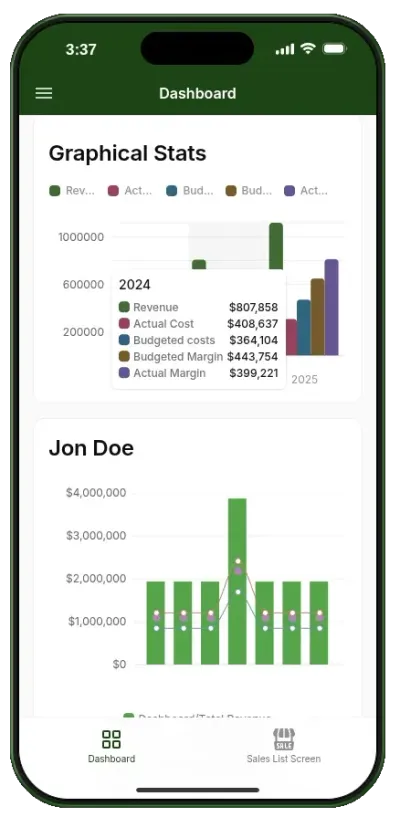
EOS client-facing chat interface dashboard

The Solution

From Manual Entry to Conversational AI

Instead of replacing the Glide app, I built an n8n automation layer that sits between the data sources (Glide, Google Sheets, and QuickBooks) and the people who need the information. The result is a chat interface where business owners can interact with their data using natural language, no app navigation required.

When a lead comes in, the manager types the details into the chat. n8n captures the data, validates it, and writes it to the correct table in Glide and the corresponding row in Google Sheets, all in under a second. When a business owner asks "is Jon Doe on the project master list?", n8n queries the connected data sources and returns the answer in real time. When a budget needs updating, a single message triggers the full update chain across Glide, Sheets, and QuickBooks.

The automation covers the full lifecycle: lead capture, data retrieval, client approval or rejection, budget updates, and project scope changes. Each action is routed through HTTP nodes that connect to Glide's REST API, Google Sheets API, and QuickBooks Online, since there was no native Glide n8n node at the time of development.

Core Visibility Screens — The Glide app itself was rebuilt around five clear operational views that give the business owners instant visibility into their numbers:

  • Sales List — Every lead, job type, and source tracked in one place, automatically populated by the n8n workflow.
  • Budget Screen — Real-time job profitability pulled from QuickBooks and Sheets, updated with every budget change.
  • Project Master — Live job health and cash visibility, showing exactly where each project stands.
  • Monthly Margin — Clear profitability at a glance, aggregated across all active and completed jobs.
  • Completed Jobs — History becomes intelligence, with past project data feeding better estimates and smarter decisions.

Cash flow is controlled through projections, inbound tracking, and non-flowing cash visibility, all surfaced through the same Glide interface and powered by the n8n backend.

Key Features

What Was Built

Every feature was designed to eliminate the gap between asking a question and getting an answer.

Natural Language Chat Interface icon

Natural Language Chat Interface

Business owners interact with their data using plain English. Queries like "what's the actual budget for the Laguna House flood restoration?" or "move Jon Dowstovitz to the approved table" are processed by n8n and answered in real time. No app navigation, no waiting for the manager.

Automated Lead Capturing icon

Automated Lead Capturing

Enter lead details once in the chat. n8n writes to the correct Glide table and Google Sheets row simultaneously, eliminating double entry and ensuring every lead is tracked from the moment it comes in.

Multi-Source Data Retrieval icon

Multi-Source Data Retrieval

Query data across Glide, Google Sheets, and QuickBooks with a single question. n8n handles the routing, joins the results, and returns a clean answer in seconds instead of hours.

Approve, Disapprove & Update icon

Approve, Disapprove & Update

Full write-back capability through the chat interface. Approve a client, reject a budget, or update project scope with a message. n8n executes the change across all connected systems and confirms completion.

Glide HTTP Integration (No Native Node) icon

Glide HTTP Integration (No Native Node)

Since no native Glide node existed in n8n at the time, every interaction with the Glide app was built using raw HTTP nodes, handling authentication, record creation, updates, and queries directly against Glide's REST API.

Real-Time Cash Flow Visibility icon

Real-Time Cash Flow Visibility

Projections, inbound tracking, and non-flowing cash visibility are computed by n8n workflows and surfaced through the Glide app. Business owners always know exactly where their cash stands.

Results

Measurable Impact

The automation eliminated the bottleneck entirely. Questions that took hours now take seconds.

< 1s
Average Response
Time
3
Data Sources
Integrated
5
Core Visibility
Screens
24/7
Available
Anytime

Eliminated the Bottleneck: The single-person dependency that caused hours of delay was removed entirely. Business owners can now get answers, update records, and manage their pipeline directly from the chat interface without waiting for the app manager to free up.

Real-Time On-Site Answers: When a business owner is on site with a client and needs to check a budget, look up project history, or confirm a service scope, they type the question into the chat and get the answer instantly. No more "I'll call you back," no more lost deals while the client waits.

Data Consistency Across Systems: Every action taken in the chat is reflected in Glide, Google Sheets, and QuickBooks simultaneously. Manual double-entry is eliminated, and the risk of data drift between systems is gone. What you see in the chat matches what's in the app matches what's in the books.

Confidence to Scale: With the automation layer in place, adding new leads, managing more projects, and expanding service areas no longer requires proportional increases in administrative overhead. The system scales with the business, not against it.

Technology

Tech Stack

Automation & Workflow

n8n HTTP Nodes Webhook Triggers Custom JavaScript

Data Sources

Glide (REST API) Google Sheets API QuickBooks Online API

Frontend & Interface

Glide Apps Chat Interface Natural Language Queries

Integration Layer

REST APIs JSON / Webhooks Data Transformation Error Handling

Client Feedback

Client Feedback

The difference is night and day. Before, if I was on a job site and a client asked about their budget or timeline, I'd have to call the office and wait for someone to dig through the app. Now I type the question into the chat and have the answer before the client finishes asking. We stopped losing deals because we couldn't answer fast enough.

EOS Client
Emergency Restoration Company, United States

Want to Automate Your Operations?

Whether you need to connect Glide with your accounting software, build a chat-driven data interface, or eliminate manual bottlenecks across your tools, I'll help you design an automation that fits your workflow.

Reach Out for a Free Consultation